

SMS Center & Parsing Templates
Purpose: Create and manage regex rules and heuristic patterns to parse incoming payment SMS messages from mobile wallets.
Overview
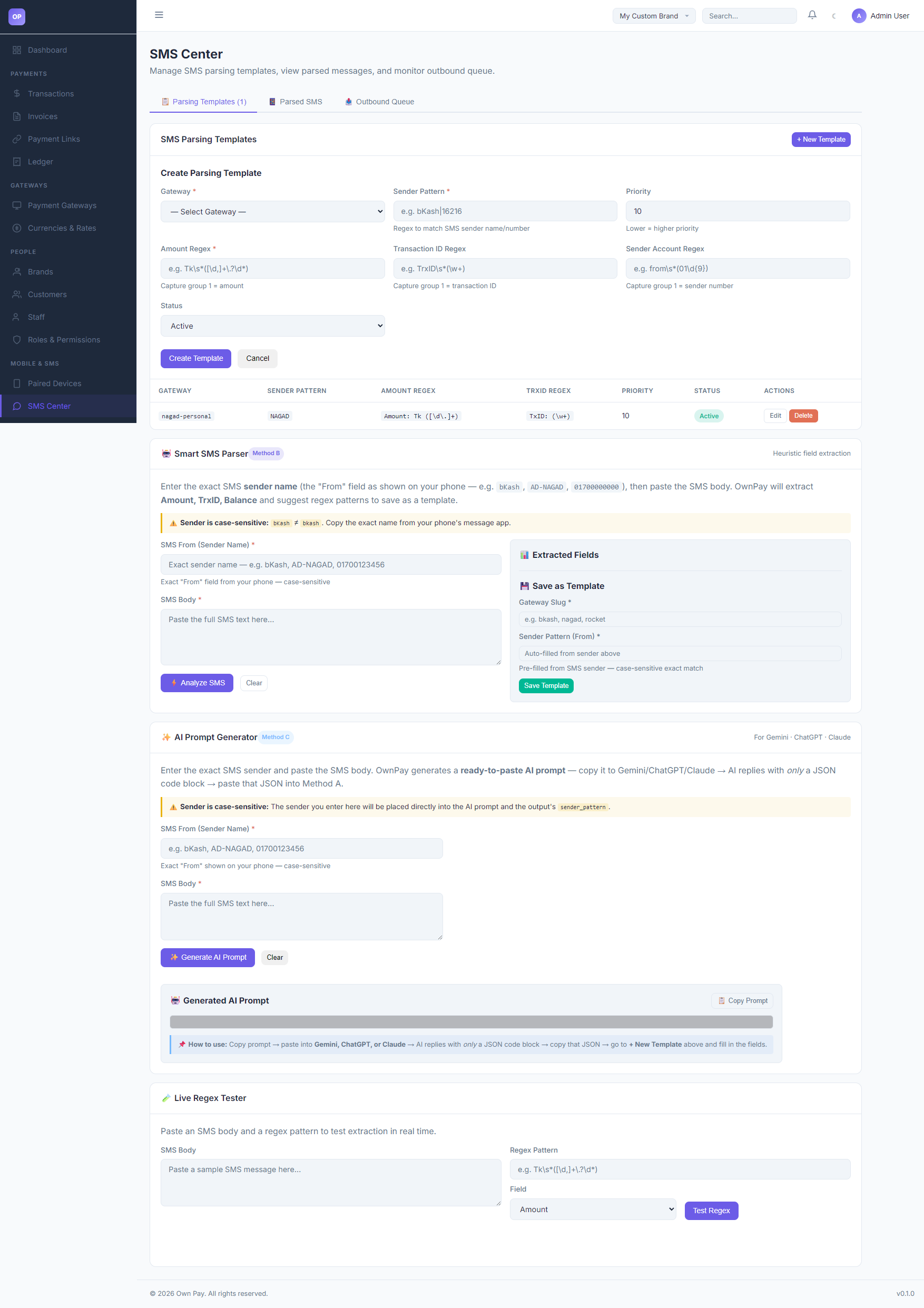
The SMS Center is the central parsing control board for manual gateway automation. When a companion device forwards an SMS transaction notification, the server maps the message to the corresponding gateway by matching the Sender Pattern (From) and extracting key fields (Amount, Transaction ID, and Sender Number) using regular expressions (Regex) or heuristic analysis.
Getting Here
To access the SMS Center:
- Log in to the OwnPay admin dashboard.
- Under the MOBILE & SMS section in the left sidebar, click SMS Center.
Page Sections
The SMS Center consists of the following key utilities:
1. Parsing Templates List
Lists all active SMS pattern matchers:
- GATEWAY: The targeted gateway slug (e.g.,
nagad-personal). - SENDER PATTERN: The regex matching the sender's identifier (e.g.
NAGADorbKash). - AMOUNT REGEX: Capture pattern for the transfer amount.
- TRXID REGEX: Capture pattern for the unique Transaction ID.
- PRIORITY: Execution priority order (1-999).
- STATUS: Active or Inactive.
- ACTIONS: Edit or Delete templates.
2. Create Parsing Template
Form to register a new pattern rule:
- Gateway Dropdown: Link to one of your active manual gateways.
- Sender Pattern: The sender's ID.
- Amount / Transaction ID / Sender Account Regex: Capture groups where group
(1)is extracted.
3. Smart SMS Parser (Method B - Heuristic)
A visual helper that allows you to paste a sample SMS and let the system suggest a regex template based on automated structural analysis.
4. AI Prompt Generator (Method C)
Generates a structured prompt to copy-paste into an AI chat assistant (Gemini, ChatGPT, or Claude). The AI translates the message structure into a JSON parsing block.
5. Live Regex Tester
A testing sandbox where you can paste a sample SMS, enter a regex string, select the target field, and click Test Regex to check extraction matches in real time.
Fields & Options Reference
Parsing Template Form Fields
| Field Name | Type | Required? | Example | Description |
|---|---|---|---|---|
| Gateway | Select | Yes | Nagad Personal | Target manual gateway to auto-verify. |
| Sender Pattern | Text Input | Yes | NAGAD or bKash | Matches the "From" header (case-sensitive). |
| Priority | Spin Button | No | 10 | Order of rule evaluation (lower numbers run first). |
| Amount Regex | Text Input | Yes | Amount: Tk ([\d\.]+) | Captures the payment amount in group 1. |
| Transaction ID Regex | Text Input | No | TxID: (\w+) | Captures the gateway Transaction ID in group 1. |
| Sender Account Regex | Text Input | No | Customer: (01\d{9}) | Captures client phone in group 1. |
| Status | Select | Yes | Active | Options: Active, Inactive. |
Step-by-Step: How to Use This Page
Creating a Regex Template Manually
- Navigate to the SMS Center and click + New Template.
- Select your manual Gateway (e.g.,
Nagad Personal). - Set the Sender Pattern to match the sender ID (e.g.
NAGAD). - Type the Amount Regex to capture the cash value (e.g.,
Amount: Tk ([\d\.]+)). - Type the Transaction ID Regex to isolate the TrxID (e.g.,
TxID: (\w+)). - Click Create Template to save.
Testing a Template using Live Regex Tester
- Scroll to the Live Regex Tester section.
- Paste a real SMS message in the SMS Body textbox.
- Enter your regex pattern in the Regex Pattern input (e.g.,
TxID: (\w+)). - Select the target Field (e.g.,
Transaction ID). - Click Test Regex. The result box will show the captured value (e.g.
12A34B56C7).
Configuration Guide
- Regex Capture Group Requirements:
- All regex inputs must include parentheses
()to designate the first capture group(1). - For example, in
Tk\s*([\d,]+\.?\d*), the parentheses capture the numerical value, skipping the currency prefixTk. Bypassing capture groups will cause parsing failures.
- All regex inputs must include parentheses
Best Practices
- ✅ Do: Test all regex patterns in the Live Regex Tester before saving templates.
- ✅ Do: Set strict sender patterns to avoid cross-matching SMS alerts from general notification sources.
- ❌ Don't: Forget that sender patterns are case-sensitive.
NAGADis not the same asnagad. - ❌ Don't: Include global flags (like
/g) inside the regex text boxes.
Must Do
⚠️ When writing regex, ensure the expression is safe from ReDoS (Regular Expression Denial of Service). Avoid nested quantifiers (e.g.,
(a+)+).
Related Pages
- Paired Devices — Connect mobile companion apps.
- SMS Data — Monitor real-time parsed SMS logs.
- Payment Gateways — Bind manual gateways to SMS parsing triggers.